Steps
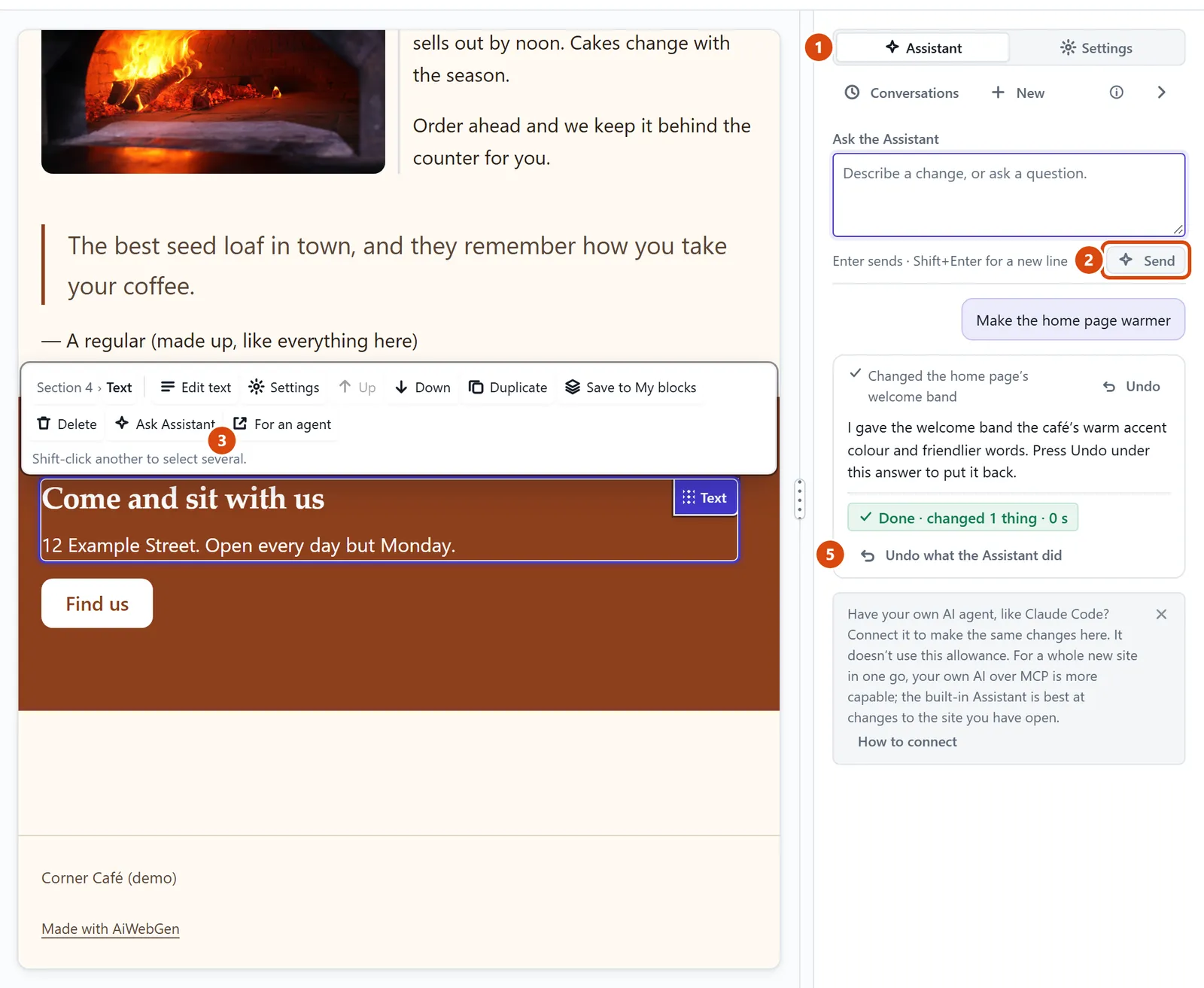
Press Assistant at the top of the right-hand panel.
Type what you want in the box, the one that says “Describe a change, or ask a question.”, and press Send.
About one thing on the page? Click that thing first, then press Ask Assistant on the small bar above it, so it knows exactly what you mean.
Watch it work through the steps. Press Stop if you change your mind. It finishes the step it is on, so nothing is left half-done.
Look at the result on the page. Not what you wanted? Press Undo what the Assistant did under its answer.
Or ask the Assistant: “How do I add a page for our opening hours?” It can explain how to do things yourself, too.
Tip: It never publishes, deletes a page or changes your domain or payments by itself. When it offers a button such as “Publish the site”, nothing happens until you press it.
Related: Get help, or tell us something · Undo a mistake or go back to an earlier version
Next: Get help, or tell us something
Still stuck? Contact support