Steps
Open the page you want to improve, then press Pages in the left sidebar.
Under “How this page looks in Google”, type a short Title and a Description. These are the words people see in the search results.
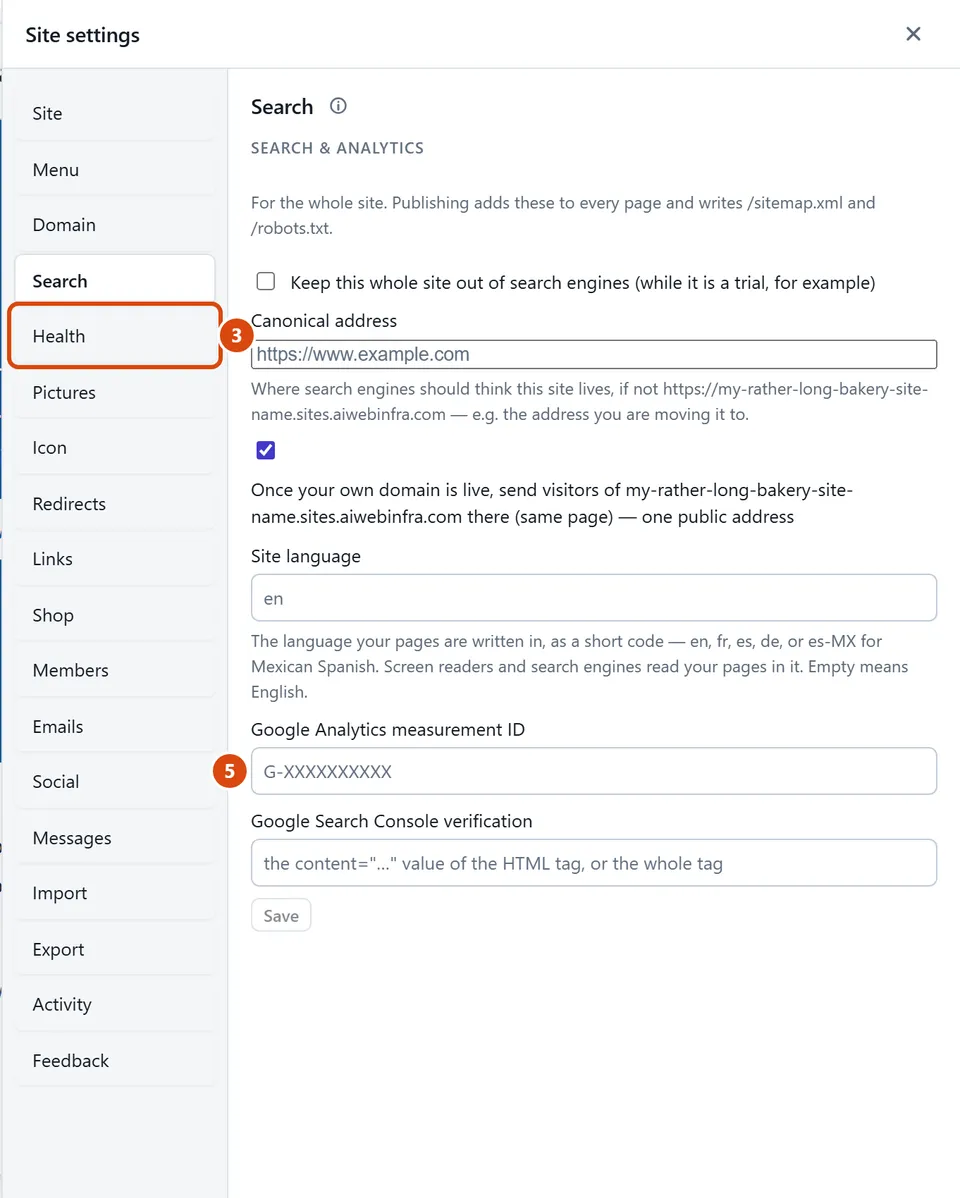
Open More › Site settings › Health to check every page at once: pictures with no description, pages with no description, and links that lead nowhere.
Press the button on a line, such as Describe it for a picture, and fill in what’s missing. Other lines say Write one or Fix it.
Want to count your visitors with Google Analytics? In More › Site settings › Search, paste your ID into Google Analytics measurement ID and press Save.
Press Publish site. Search engines only see what is live.
Or ask the Assistant: “Write a search description for every page that doesn’t have one.”
Tip: It can take Google days or weeks to notice a new site. That is normal, and nothing you need to fix.
Related: Share on social media · Put your site on the web
Next: Share on social media
Still stuck? Contact support