Steps
On the list of your websites, press Create a new website.
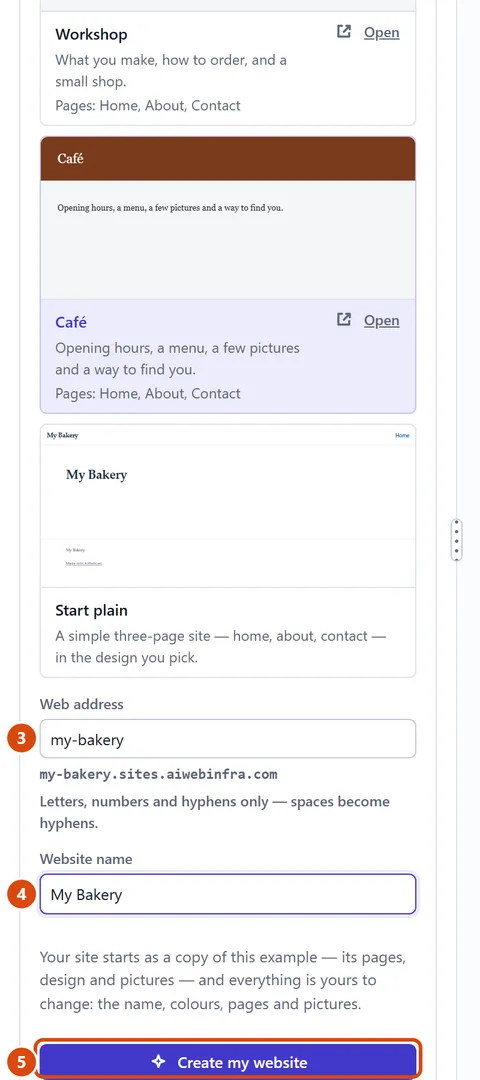
Under “Start from”, press the card you want. An example gives you its pages, design and pictures to change. “Start plain” gives you a simple home, about and contact page. If you see “Describe your business”, you can tell us what you do and the Assistant builds the site for you.
Type a Web address, such as my-bakery. Use letters, numbers and hyphens. You can add your own domain later.
Type your Website name, such as My Bakery.
Press Create my website. Your new site opens in the editor.
If the Assistant is building it from your description and stops part-way, press Keep going.
Or ask the Assistant: “Change the example’s words and opening hours to suit my bakery in Bristol.”
Tip: Want to take money? Connect Stripe later in More › Site settings › Shop, then Payments. Downloads and paid pages are part of Pro.
Related: Find your way round the editor · Change the whole site’s colours and fonts
Next: Find your way round the editor
Still stuck? Contact support