Steps
Open More › Site settings › Domain. Your own domain is part of the Pro plan. On Free you see Upgrade this website here instead, and your first upgrade starts with 7 days free.
Type your address in Domain you already own. We recommend the www. version, for example www.yourbusiness.com.
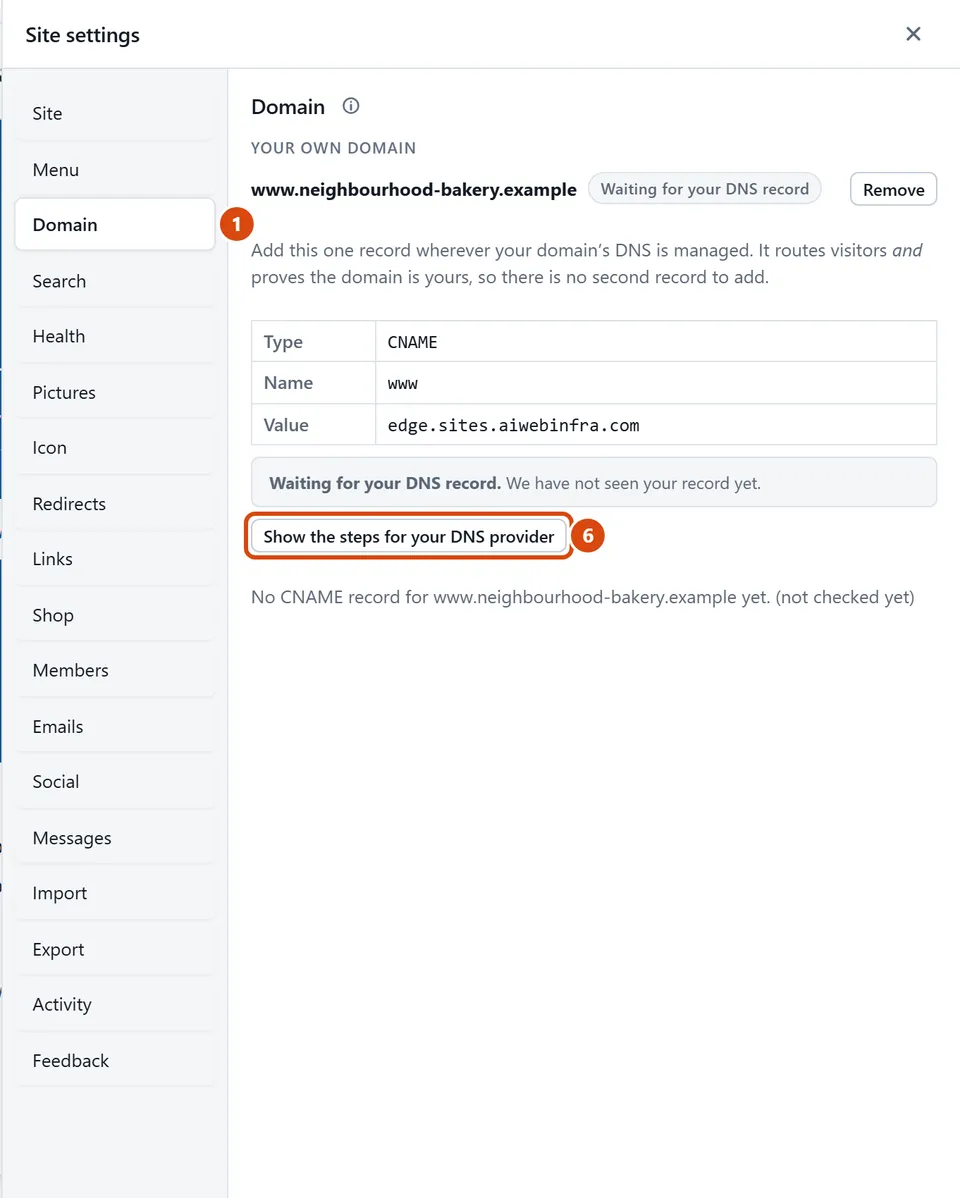
Press Connect this domain. The panel then shows one record to add. A record is one line in your domain’s settings.
Where you bought the domain (GoDaddy, Namecheap and so on), open its DNS settings: the page that says where your domain points. Add a new record with the panel’s Type, Name and Value, for example Type CNAME, Name www, and the long Value shown.
Leave the editor open, or come back later. The panel shows how far it has got: “Waiting for your DNS record”, “Record seen”, “Issuing the certificate” (the padlock that makes your address safe), “Going live” and then “Live”. It usually takes minutes, sometimes a few hours.
Someone else looks after your domain? Press Show the steps for your DNS provider, then send them the “open the instructions” link. It works for 7 days.
Or ask the Assistant: “I bought mybakery.com at GoDaddy. Walk me through connecting it.”
Tip: The most common mistake is pasting the Value into the Name box. Name usually goes in a box called Name or Host, and Value goes in Value or Points to.
Related: Put your site on the web · Show up on Google
Next: Show up on Google
Still stuck? Contact support