Delete or copy something
Take something off the page, or make a copy of it just below.
Steps
On the page, click the thing you want to delete or copy.
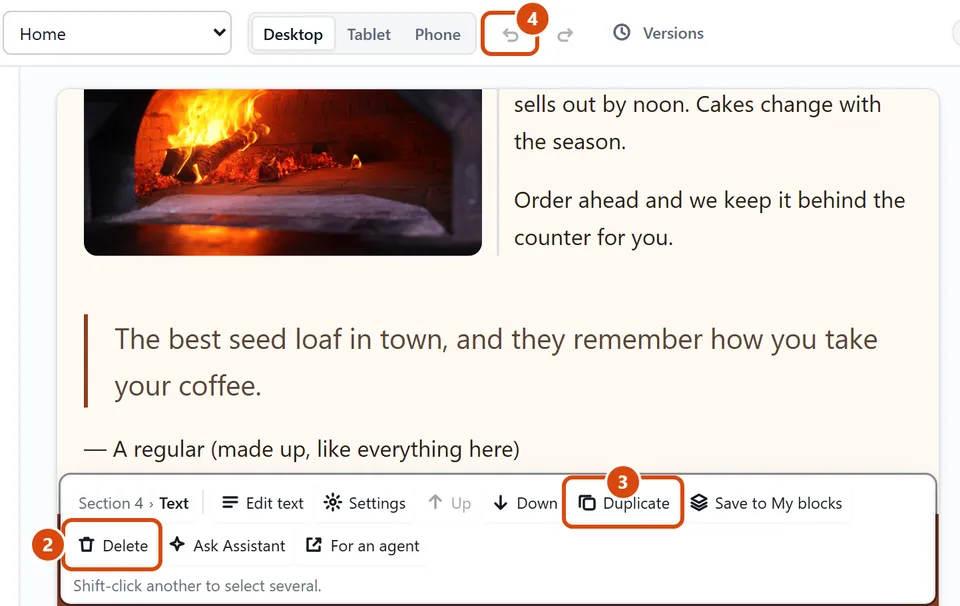
Press Delete on the small bar above it, or the Delete key on your keyboard.
To copy it instead, press Duplicate on the bar (Ctrl+D, or Cmd+D on a Mac). The copy goes right after it.
Changed your mind? Press the Undo arrow at the top of the editor (Ctrl+Z, or Cmd+Z on a Mac).
Or ask the Assistant: “Delete the second picture gallery on this page.”
Tip: Deleting a section takes everything inside it too. Undo brings it all back.
Related: Undo a mistake or go back to an earlier version · Move something up or down
Next: Save a section to use again
Still stuck? Contact support