Skip to content
AiWebGen
  • Home
  • About
  • Pricing
  • Contact
  • Connect your AI
  • Help

Help › Pages and the menu

Change the site’s name, header or footer

Rename your website, and set up a header and footer that look the same on every page.

Steps

  1. Open More at the top of the editor, then choose Site settings. It opens on Site.

  2. Type the new name in Site name and press Rename. It shows in the header, in every page’s title and on the payment page. Your web address stays the same.

  3. For a header that’s the same on every page, press Add a site header…. A footer works the same way, with Add a site footer….

  4. Pick what to Start from, then press Add site header.

  5. Already have one? Press Edit site header (or Edit site footer) to change it right on the page.

  6. Press Publish site at the top so visitors see the changes.
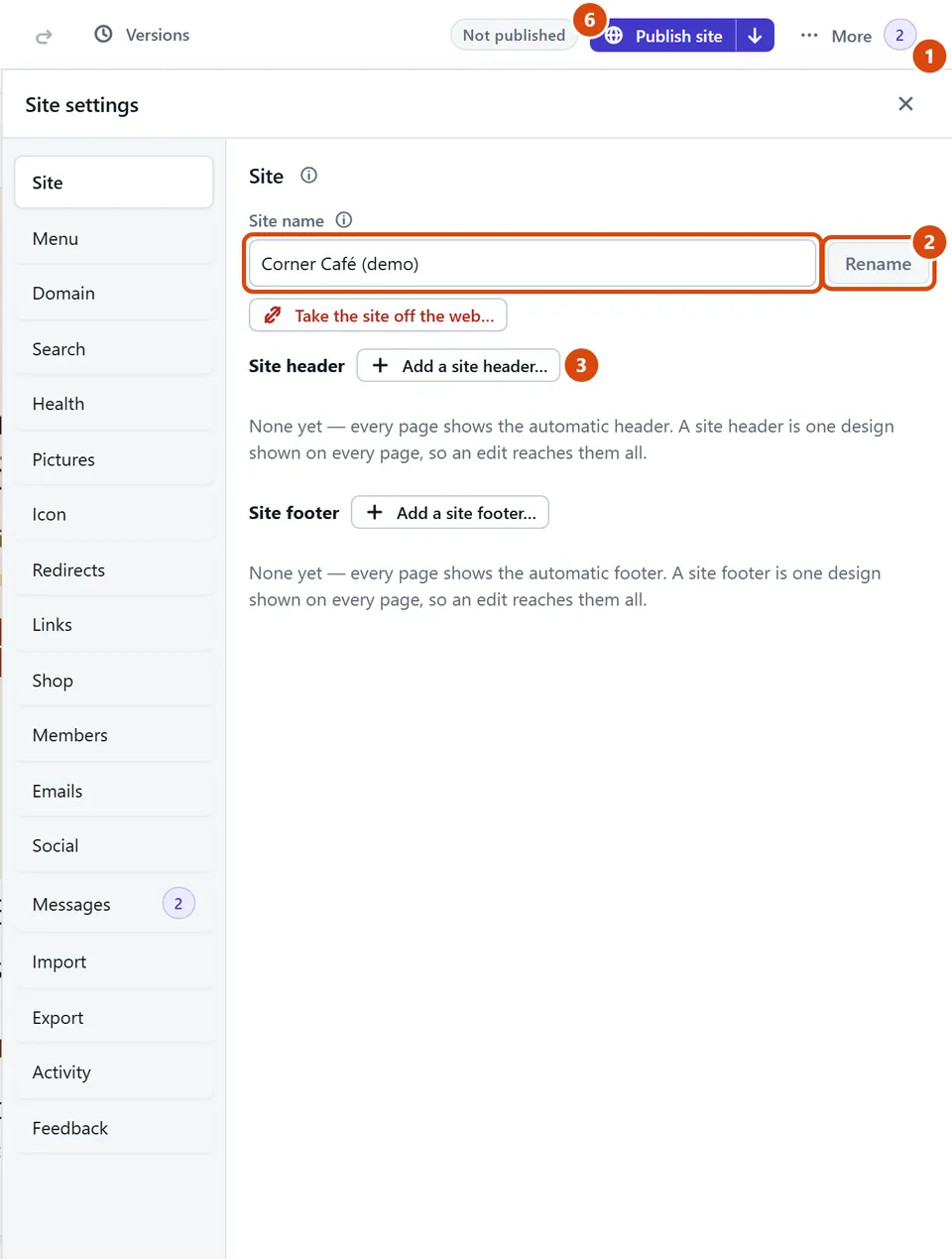
The editor, with Site name, Rename circled and each step numbered.

Or ask the Assistant: “Rename my site to Rosie’s Bakery.”

Tip: The little picture in the browser tab is set in More › Site settings › Icon. A square picture works best.

Related: Reorder the menu or make a submenu · Take your site off the web

Next: Add a contact form

Still stuck? Contact support

AiWebGen