Link words to a page or another site
Turn some words into a link, so visitors can click them to go to one of your pages or another website.
Steps
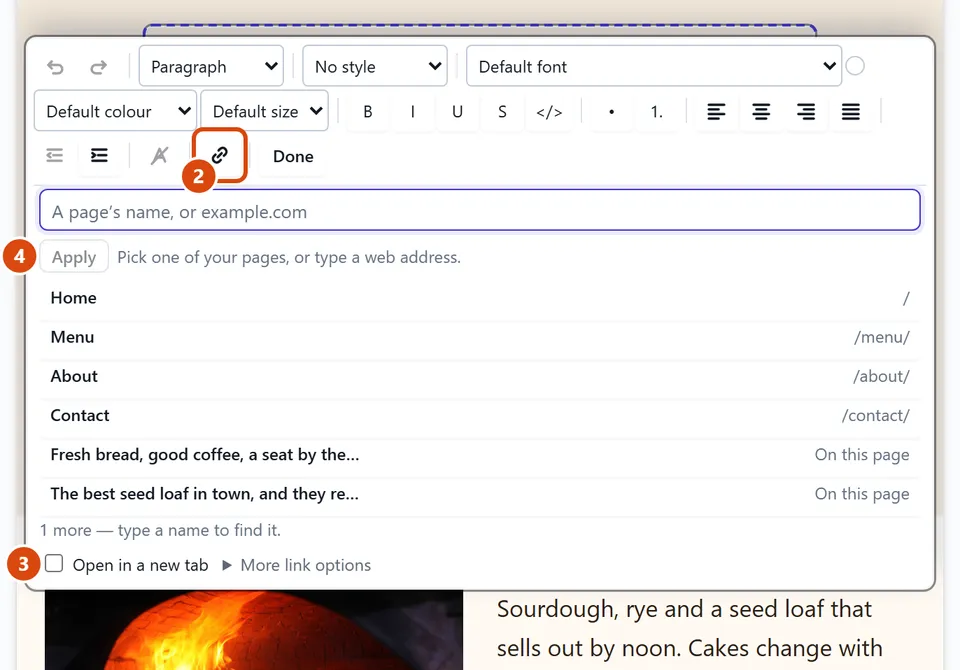
Double-click the text on the page, then select the words you want to link.
In the bar over the text, press Add a link (the chain icon).
If the link should open in a new tab, tick Open in a new tab.
Press one of your pages in the list. Or type a web address, such as example.com, and press Apply.
Or ask the Assistant: “Link the words ‘book a table’ on the home page to my Contact page.”
Tip: To take a link off, click into the linked words and press “Remove the link” in the same bar.
Related: Change words, or make a line a heading or a list · Put a page in the menu
Next: Change the whole site’s colours and fonts
Still stuck? Contact support