Give one section its own background colour
Colour the background of one band of your page, without changing the rest of the site.
Steps
Click an empty part of the band, away from its words and pictures. That selects the whole section, and its settings open on the right.
In its Settings, find Look. If it says a change here also changes other things, press Only this one: give it its own style first.
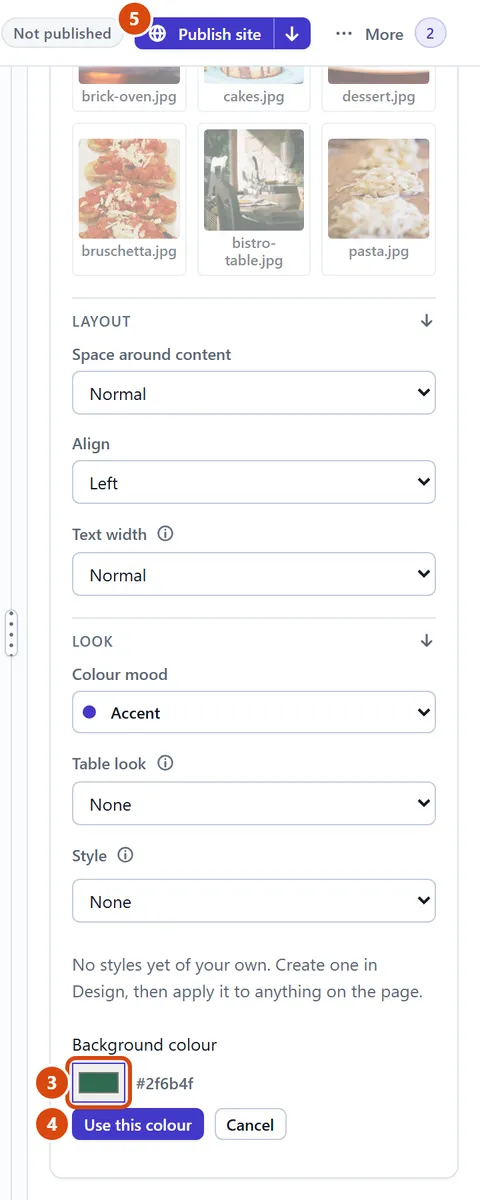
Next to Background colour, click the colour box and pick a colour.
Press Use this colour. The section changes straight away.
Press Publish site so visitors see it.
Or ask the Assistant: “Make the background of the opening-hours section a soft cream colour.”
Tip: Clicked the words instead? In the small bar on the page, press the band’s name, such as “Section 2”.
Related: Change the whole site’s colours and fonts · Change the colour or size of some words
Next: Add a section
Still stuck? Contact support